





The Party Was for “Client Entertainment.” There Were 200 Guests. One Was a Gladiator Made of Ice.
In the late 1990s, Dennis Kozlowski was the CEO of Tyco International — a sprawling industrial conglomerate that made fire sprinklers, medical supplies, and, apparently, one very memorable birthday party. It was the year 2001. Karen Kozlowski was turning 40. Her husband, a man who had built Tyco into a $40 billion empire through sheer aggression and deal-making, decided she deserved a celebration befitting her station. He chose Sardinia. He chose a toga theme. He chose Jimmy Buffett.
The tab came to $2 million.
Half of it — a cool $1 million — was charged to Tyco as a business expense. A “shareholder event,” the paperwork apparently suggested. Kozlowski himself was later caught on video telling guests this party would “bring out a Tyco core competency.” That competency, he clarified, was “the ability to party hard.”
Guest count: approximately 200. Legitimate Tyco business associates among them: debatable.
Here’s the thing. A $2 million receipt, on its own, is alarming. But you know what would have immediately, automatically, silently flagged this before a single dollar left the account?
A guest count field.
Because the moment you divide $1,000,000 by 200 guests, you get $5,000 per person. Which is, by almost any company’s expense policy, a number that causes an alert to fire, a manager to receive an email, and a compliance officer to sit up very straight in their chair. You don’t need to catch a CEO stealing millions. You just need a system that notices the dinner cost five thousand dollars a head.
Veryfi API
Veryfi Receipts OCR API automatically extracts the guest count directly from the receipt itself — no manual input required. When a restaurant prints the number of covers or guests on the check (as shown above with “Guest Count: 18”), Veryfi captures this as a structured guest_count field in the API response.
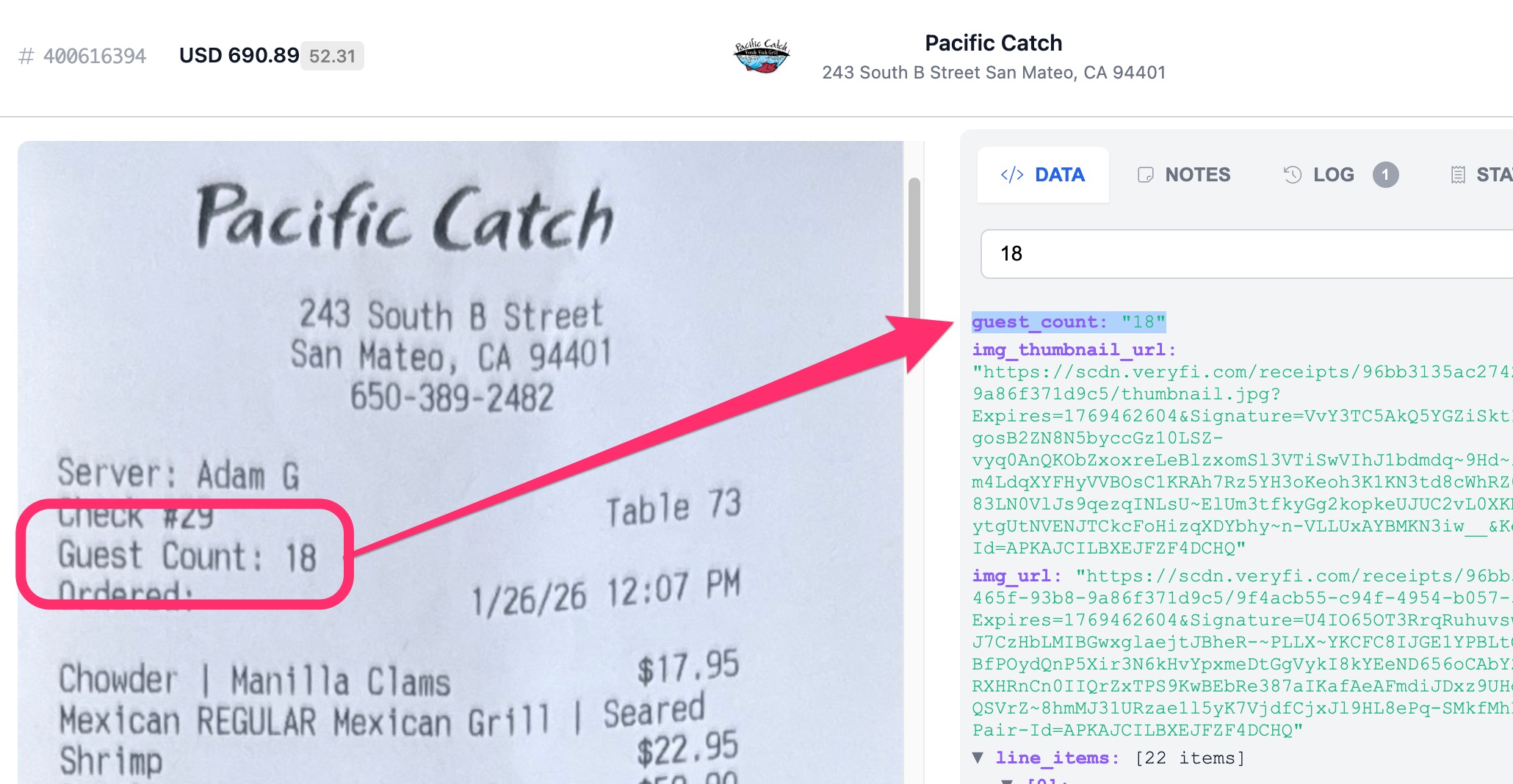
This data feeds directly into Veryfi’s Attendee Validation feature, which calculates the per-head spend and benchmarks it against typical meal ranges. In the example above, a $690.89 bill for 18 guests works out to $38.38 per person — falling within the $30–$50/head benchmark and flagged as Within Benchmark.
The example below uses both guest_count and date fields, both available to all Veryfi API customers.
Most expense policies treat a meal like a meal — a flat per-person cap regardless of context. But a working lunch at a sandwich counter is not the same occasion as a Friday night client dinner, and your policy probably shouldn’t pretend it is.
By combining guest_count with date — which gives you both the calendar date and time of the transaction — you can build spend rules that reflect how business actually happens. A $180/head dinner on a Friday with six guests is probably legitimate client entertainment. The same charge at 11:30am on a Monday is a different conversation entirely.
This lets you move from a single blunt threshold to a contextual one — tighter caps at breakfast, moderate at lunch, more generous in the evening when client entertainment is expected. The result is a fairer policy: employees with legitimate reasons to spend more aren’t blocked by a rule written for the average case, and the outliers don’t slip through either.
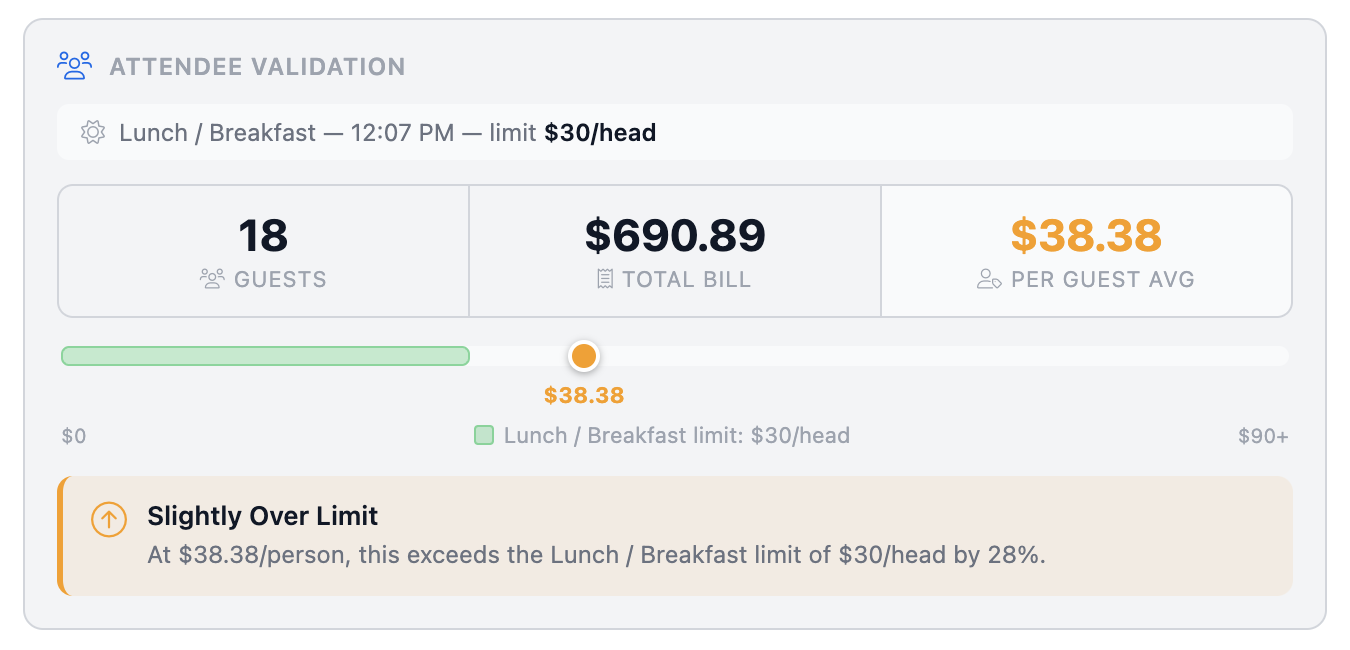
For T&E auditors and finance teams, this means the headcount on the expense claim can be automatically cross-checked against what’s printed on the receipt — eliminating one of the most common forms of meal expense abuse without any manual review.
Use Cases
Fraud & Compliance
- Flag solo diners expensing meals above per-person thresholds
- Catch repeat patterns (same employee always dining “with clients” but guest count is 1)
- Verify that entertainment expenses meet IRS/policy minimums (e.g., must be 2+ people to qualify as a business meal)
Policy Enforcement
- Auto-approve meals under a per-person cap (total / guest_count) rather than a flat total — fairer and smarter
- Flag when per-head cost exceeds a threshold (e.g., $150/person) even if the total looks acceptable
- Enforce executive vs. employee meal limits differently based on headcount
Spend Analytics
- Calculate average spend per person across teams, departments, or managers
- Benchmark meal costs per guest across vendors/restaurants
- Identify which teams are expensing large group meals frequently
Approval Routing
- Route differently based on group size (solo meals auto-approve, group meals over X people require manager sign-off)
- Flag unusually large groups as potential event spend disguised as a meal
Budgeting & Forecasting
- Normalize meal spend across team sizes for fairer budget comparisons
- Track entertainment patterns — is a team doing more client-facing meals over time?
Vendor/Category Insights
- See which restaurants are used for large group vs. solo dining
- Identify if certain vendors are being used for what appear to be team events but expensed as individual meals
So, are you using the guest_count field yet?
TLDR
- Part of Fraud & Document Integrity
- Ideal for T&E auditors and finance teams
- Available in: Receipts OCR API
- JSON Key:
guest_count
Have questions? Email [email protected]